Ruzz Watch Setup
Operating Instructions and Functions Navigation Ruzz Watches features one AMOLED touch screen and four physical buttons.
Basic Operations
Touch screen
You can swipe left/right or up/down on the watch face to switch between different function pages.
SELECT button: Long press the button for 2 seconds to power on the watch. Short press to light up the screen. Short press on the watch face will open the workout list. (You can also set this operation to quickly start other functions by customizing in the system settings.) Short press on other pages will enter the next menu level, or enter a sub-page when on a list page. Long press for 10s to shut down. BACK button: Short press to light up the screen. Short press on the watch face to turn off the screen. Short press on other screens to return to the previous page. Long press on other screens to quickly return to the watch face. UP & DOWN buttons: Short press on the watch face to switch between different widgets. Short press on any list screen to change the currently selected item. Short press on a long page to scroll up and down.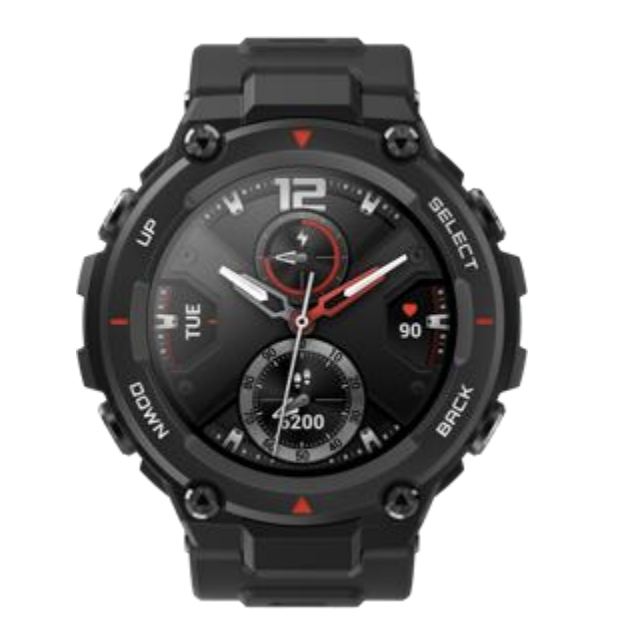
SELECT button: Long press the button for 2 seconds to power on the watch. Short press to light up the screen. Short press on the watch face will open the workout list. (You can also set this operation to quickly start other functions by customizing in the system settings.) Short press on other pages will enter the next menu level, or enter a sub-page when on a list page. Long press for 10s to shut down. BACK button: Short press to light up the screen. Short press on the watch face to turn off the screen. Short press on other screens to return to the previous page. Long press on other screens to quickly return to the watch face. UP & DOWN buttons: Short press on the watch face to switch between different widgets. Short press on any list screen to change the currently selected item. Short press on a long page to scroll up and down.
Related Articles
Watch Wearing and Charging
Daily wearing: During daily use, it is recommended to wear the watch with a moderate tightness at a distance two fingers far from your wrist to ensure that the optical heart rate monitor works properly. Wearing during workouts: During workouts, it is ...